Have you ever wondered why some pages fail to appear in Google search results? It isn’t simply a case of poor page content. Rather, it’s the number of pages that Google makes it possible to crawl, and the pages that Google prioritizes. Search engines, including Google, only look at a fraction of the pages on a site during a crawl. If this SEO crawl budget is wasted on the incorrect pages, important content is left behind, and rankings drop, leading to diminished traffic. That’s why understanding crawl budget optimization is crucial, and Indexed Zone SEO can guide you through mastering this essential aspect of search visibility.
Crawl Budget in SEO: Definition and Importance
Crawl budget can be defined simply as the number of pages that Googlebot, and other search engines, can or will crawl on a given website at a given time. The number of pages can be determined by the number of pages your server can handle, as well as how much Google wants to crawl your content.
Consider your crawl budget akin to a pizza delivery driver with a quota of 20 stops. If the driver wastes time by delivering to the wrong addresses, your pizza will arrive burnt before the 20-stop mark.
Crawl Budget Meaning: The Two Core Components
Google’s documentation states that a crawl budget consists of two fundamental elements:
- Crawl rate limit: Googlebot can send to your server without risk of crashing or slowing down significantly.
- Crawl demand: How eager Google is to crawl your pages based on popularity, freshness of content, quality of links, and other user engagement signals.
💡 Real-world example: Consider you have a store online with 20,000 products. Googlebot visits 2,000 pages every day. At that pace, a new product could take almost 10 days just to be discovered, not to mention indexed and ranked.
Why Is Crawl Budget Critical for Your Business
Why is crawl budget critical for your business? It seems to boil down to revenue. You’re on Google, but you can’t be found by your customers because Google can’t crawl your pages and index your pages that make money for your business. For a business with a big site, the result is lost revenue, less site growth, hassle of competition, lost marketing dollars, and crawl budget driving less growth for your site.
The main point is this: websites that have less than 500 pages typically do not have to worry about crawl budget at all. But for those who do have large-scale sites, like big e-commerce websites, large blogs, SaaS platforms with thousands of URLs, and sites that dynamically generate pages, learning how to optimize crawl budget becomes very important for SEO.
📌 Do you want to know how crawl budget influences your search visibility? Read our Beginner’s Guide to search engine positioning.

How To Measure Crawl Budget, Recognizing The Signs
It’s very likely that you have an issue with crawl budget SEO if pages take weeks to get indexed, if there is a large gap in Google Search Console between pages that are “Discovered” and “Indexed”, and if your logs show that Googlebot is getting stuck on duplicate pages and filters.
Warning Signs
Here are the correct ways to check for crawl issues on your website:
- New pages take a while to get indexed – Quality content that is not indexed for 7 to 14 days is a problem.
- GSC shows more discovered URLs than indexed – The ratio of discovered to indexed pages that is 70% or lower is a problem for wasted crawl budget.
- Google is crawling your server logs while ignoring low-value pages – Filtering and expired pages waste crawl budget.
- There are large gaps in the crawl stats – Large gaps score a negative point on the technical side of things or on the confidence side of Google.
- There are valuable pages not ranking even though the content is good – the crawl budget is often the reason.
- There are too many 404 errors and redirect chains – These signal wasted crawl budget and poor site health.
One fashion retailer found that 65% of its product pages were not indexed. Once they set up robots.txt blocks on the faceted navigation filters, their indexation improved to 92% in 30 days, and they achieved 34% more organic traffic.
✅ Pro tip: There is a lot of wasted budget on server log analysis. You could find that Google is hitting the wrong pages hundreds of times each month while ignoring the pages that will help you make money.
Where to Check Crawl Data
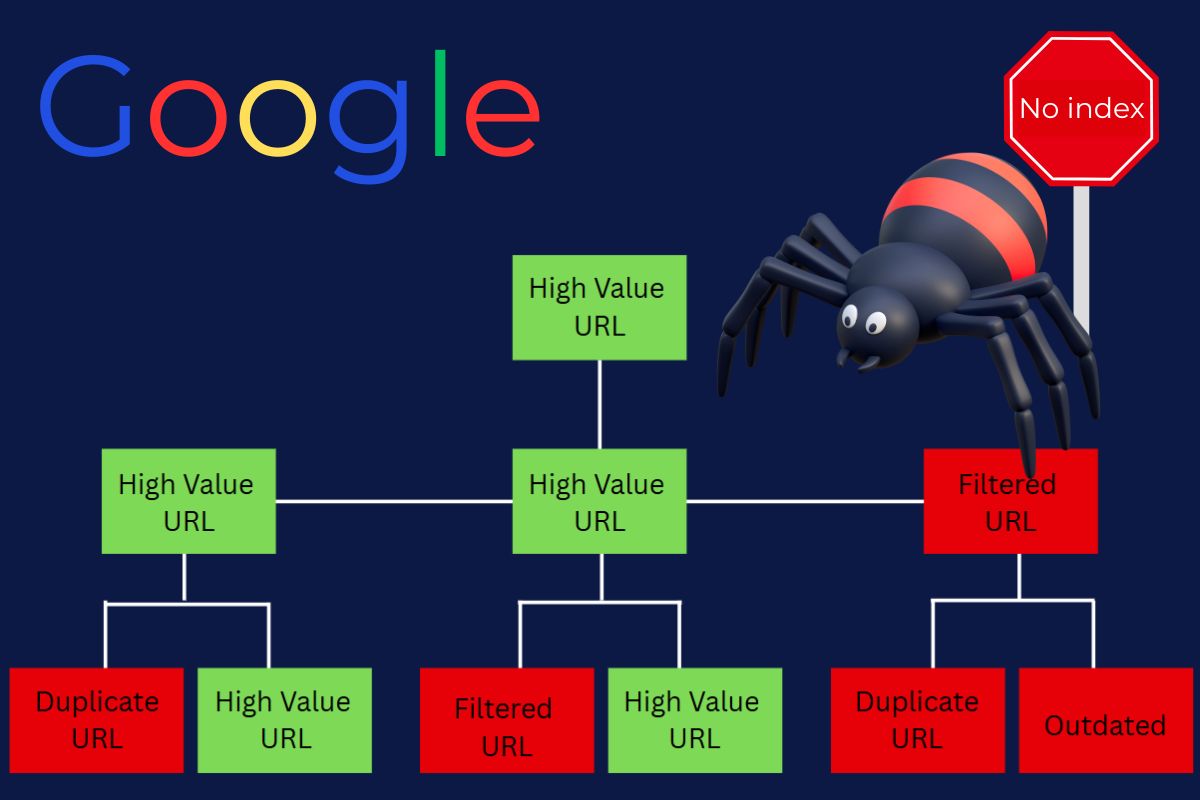
To measure your budget from the SEO perspective, you will start at the crawl statistics in Google Search Console, then the coverage reports, and lastly, the server logs.
- Google Search Console – Go to “Settings > Crawl stats” to view daily reports on how often your site has been crawled and what Googlebot’s response codes and download times are.
- Server logs – These will tell you what pages Googlebot visits and how often. Screaming Frog Log File Analyzer and similar tools help you dissect this.
- SEO crawling tools – such as Sitebulb and Screaming Frog – These are best for simulations to find duplicate content and poor internal linking.
📊 Concrete example: Google Search Console shows 10,000 URLs discovered and 5,000 indexed. This means you are inefficiently spending your crawl budget on SEO. 50% indexation means half your crawl budget is being wasted.

Three Main Factors That Impact Crawl Budget
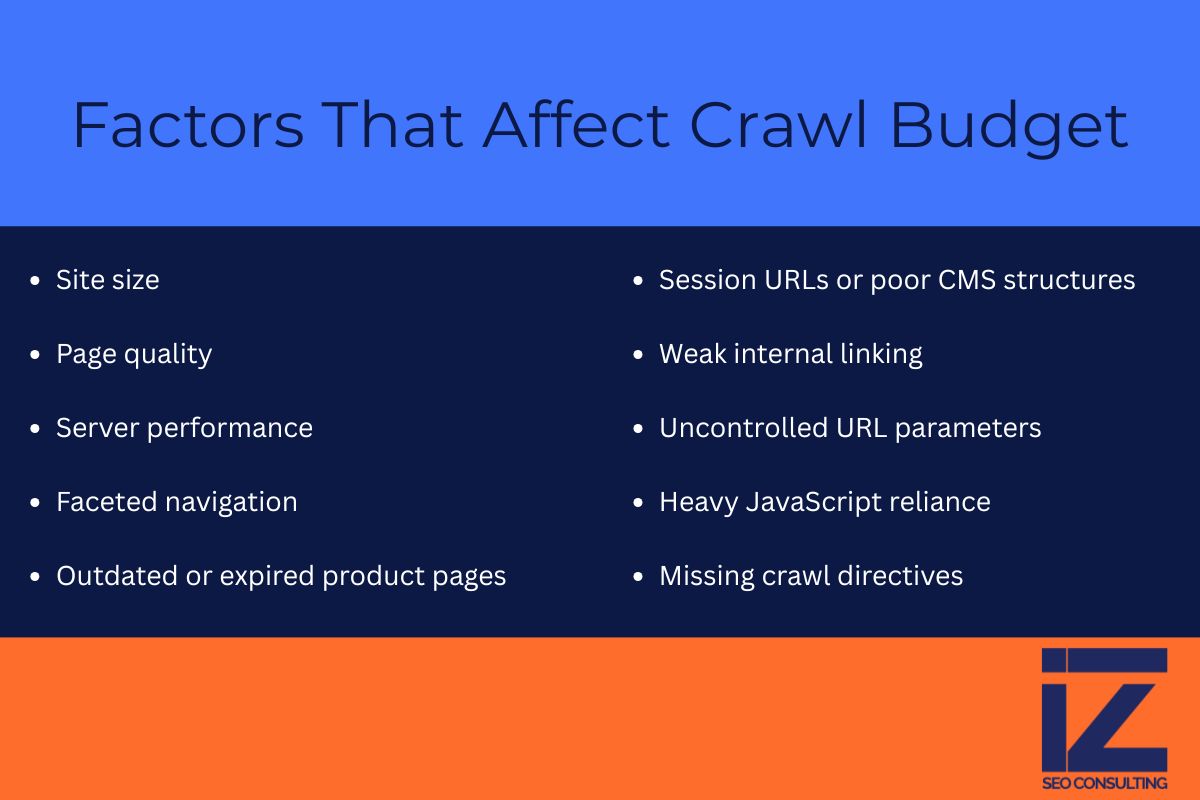
What has the largest potential to most negatively impact crawl budget? Site size, the quality of pages on the site, and how the server performs. For e-commerce, there are also problems with outdated product listings and faceted navigation.
The Main Factors That Affect the Distribution of Crawl Budgets
- Website size – The larger the website, the more crawl budget issues it will have. Websites with more than 10,000 URLs need active crawl budget management.
- Page quality – Google looks at the total website to assess quality. Pages that are thin on content, repetitive pages, and pages with low to no value are budget killers. Google values pages that offer genuine value to users.
- Performance of the server – If the server lags or times out, Googlebot will visit the site less often. An optimal performance time is less than 200 milliseconds.
📌 Google has publicly stated that these are major factors in their documentation of Search Central.
Other Important Factors
- Structure of the site and internal links – Pages that are too deep or that have few internal links are not sufficiently crawled.
- Frequency of updates – Sites that frequently post updates and new content get crawled more often.
- Link profile – Pages that have strong authoritative links get crawled more often due to their importance.
- Mobile friendliness and Core Web Vitals – Sites that give a bad user experience may experience a decrease in crawl rate.
- XML Sitemap – Googlebot is able to know where to look for the important pages of a site with an updated Sitemap. An outdated Sitemap can waste the budget.
📌 Along with SEO factors, these factors determine your overall visibility in search results.
Crawl Budget Destroyers in E-Commerce
- Faceted navigation – Filter options for color, size, price, and brand can produce 100,000 + almost identical URLs. A single product page can create more than 50 filtered variations.
- Zombie pages – Discontinued pages that have broken images, old information, and no potential to convert still waste crawl budget.
- Session IDs and messy CMS – create endless duplicate page variations that waste crawl budget.
- Improper use of pagination – Hundreds of category pages that are just meant to be crawled waste budget without pagination markup.
- URL parameters not controlled – Things like ?utm=, ?sort=, ?filter=, ?ref= are likely to create many duplicates.
- Poor rendering of JavaScript pages – JavaScript hides critical elements and makes you crawl incomplete versions of pages.
Takeaway: Bigger sites use crawl budget too quickly. Not pruning pages of lesser value and not improving internal linking makes crawl budget an SEO growth-limiting factor.
How to Optimize Crawl Budget: The Complete Action Plan
If you want to make your crawl budget more efficient, concentrate on: blocking worthless URLs, consolidating duplicate content, improving internal linking, removing dead weight, optimizing the technical setup, and keeping the sitemap updated.
Phase 1: Block and Eliminate Crawl Waste
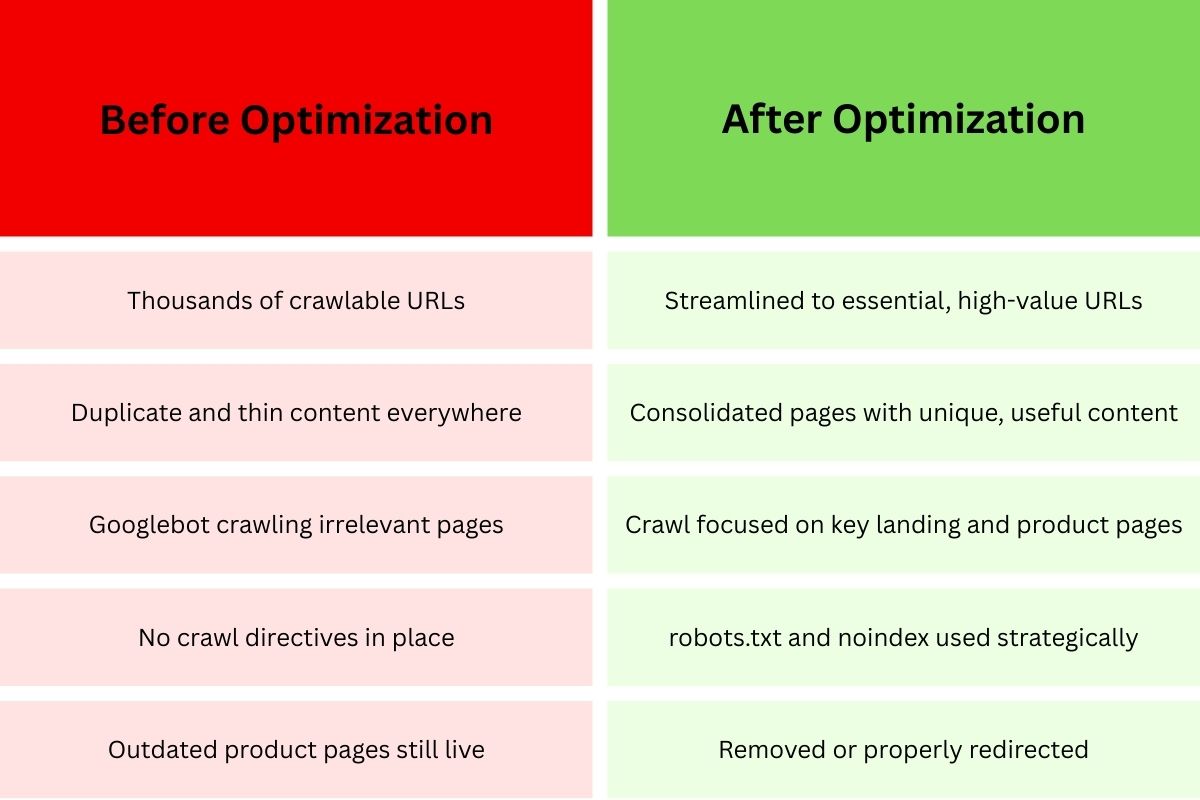
- Use robots.txt to block worthless URLs – Remove pages from consideration for crawl budget on shopping carts, checkout pages, search results, admin pages, and navigational filters.
- User-agent: Googlebot Disallow: /cart/ Disallow: /checkout/ Disallow: /*?filter= Disallow: /search?
- Use noindex for low-value pages you want accessible – In contrast to robots.txt, noindex allows the page to be crawled, but not indexed, for internal search pages and customer account pages.
- Use URL parameter handling in Google Search Console – Tell Google which URL parameters you want it to ignore.
- Remove low-quality content – Remove duplicate content, really short descriptions, out-of-date blog posts, and categories that are duplicates.
Phase 2: Consolidate and Strengthen
- Use canonical tags to tell Google the preferred version of a duplicate page – Tell Google which page should use the crawl budget.
- Use 301 redirects for content that has been permanently moved – This tells Google to crawl a different page, and keeps the linking equity so you don’t lose a page’s authority.
- Strengthen internal linking to the money pages – Make sure that every important page is linked from the home page, is in the main navigation, and is linked from any high authority pages. Try to ensure that the high-value pages are no more than 2-3 clicks from the home page.
- Build hub pages and topic clusters. Use relevant and strong internal links. Google will better understand the structure of your pages.
Phase 3: Technical Optimization
- Improve your server response times. Upgraded hosting, implementing caching, optimizing database queries, and using a CDN will help. Target response times of under 200 milliseconds.
- Optimize the rendering of your JavaScript. Critical content should exist in the HTML. Use server-side rendering for important pages.
- Fix issues concerning Google’s Core Web Vitals. Low scores for LCP, FID, and CLS can result in more infrequent crawling of your pages.
- Monitor and correct server issues. 5xx errors signify problems in your server, which leads Google to slow down and even stop crawling.
Phase 4: Guide and Update
- Keep your XML sitemaps updated and strategic. Googlebot will be able to more efficiently find and prioritize pages if you submit a new sitemap more frequently. Segment larger sitemaps into smaller, focused sitemaps.
- Sitemaps should include lastmod dates. Google will prioritize content that has been updated based on accurate last-modified dates.
- For pages that are time-sensitive, use the URL Inspection tool. You can request urgent indexing for content that is time sensitive, breaking news, or limited-time offers.
Phase 5: Monitor and Iterate
- Crawl statistics should be analyzed weekly. In the Google Search Console, the crawl statistics report shows data on the trends, requests, response times, and errors.
- Perform analysis of server logs each quarter – look closely at what Google crawls versus what you want it to crawl.
- Measure indexation rates – track the ratio of discovered to indexed URLs. For most sites, a good score would be 80% or higher.
Real Success Story Examples
- E-commerce retailer: One company blocked cart and search pages, then removed 5,000 outdated product listings, and, in 6 weeks, increased indexed pages by 18% and decreased crawl waste by 40%. In 3 months, organic traffic increased by 27%.
- Publishing site: A news site optimized internal linking and strategically applied a noindex on certain tag pages. 48 hours to index new articles dropped to 24 hours for 92% of new articles.
The most important principle of crawl budget optimization: This is not a one-and-done solution. To improve Google crawl budget, you need to monitor, test, and adjust continually as your site changes.
FAQ: Crawl Budget in SEO
Google does not have a specific timeline. They change it dynamically based on your site’s server health, site popularity, how new the content is, and how engaged the users are. If your site has high authority and is updated frequently, you will likely notice more crawl activity.
Yes. Older pages that have high-quality backlinks and are updated regularly tend to get crawled more. For new pages, strong internal linking and XML sitemap inclusion are critical for acquiring an early crawl.
Not really. Google is the most aggressive when it comes to crawling. Bing and Yandex tend to be more conservative and have smaller crawl budgets.
Only indirectly. A noindex tag does not stop Googlebot from crawling the page. It must visit the page to ‘read’ the noindex directive. If you really want to save crawl budget, use a robots.txt disallow directive to stop crawling entirely.
Google Search Console crawl stats paired with server log analysis is the best way. GSC gives you a good overview, and server logs tell you what pages Google crawls and how often. For large sites, check the data weekly. For small sites, check it monthly.
When your site has more than 1,000 URLs, and you notice an indexing lag. At 10,000+ pages, new content takes a week or more to index, and less than 70% of the discovered URLs are indexed; you should worry a lot more.
The Business Impact of Getting This Right
The best or possibly only method to break the cycle of stagnant organic growth or slow scaling is the effective management of your SEO crawl budget. Companies that achieve this have been known to experience within a period of 3-6 months:
- 30-50% faster indexation
- 20-40% improvement in indexation rates
- 15-35% increases on organic traffic
- A substantial increase in ROI on content that is created
Let’s be realistic, improving crawl budget efficiency is more than just about technical SEO. It’s about making sure every dollar spent on content improvement is designed to be effective and reach people through search engines.
Ready to Take Action?
Don’t let Google Analytics and inefficient crawl budget management hold your website back. Most businesses leave 20-40% of potential organic traffic on the table because Google can’t crawl their site.
Would you like expert help in maximizing your crawl efficiency? Learn more about how Indexed Zone SEO helps your business improve in measurable ways, crawl budget optimization, and overall search performance.