Have you ever needed a service, like a coffee shop or a plumber, when you see a Google search display and a map with a list of businesses? That is a Google Business Profile, and most local businesses often see profiles before customers even enter their websites. Getting your profile correct, as outlined in this Indexed Zone SEO guide, helps customers easily identify you, which helps you avoid becoming invisible online.
Why Are Google Business Profiles Significant?
Profiles and potential customers are losing trust in verifications and convincing customers. Google said, “Just because a business has a website, doesn’t mean it is trustworthy or useful. What a potential customer is looking for is the most efficient way to reach a verified business, and have access to a product or service of their choice.”
If your Google Business Profile is empty or not fully answered, unlike your competitors, you sit on the sidelines while your competitors are gaining customers and calls.
A business profile showcases your services:
- Where your business shows up on local maps
- If people will phone your business, get directions, or visit your website
- How many people trust you based on your reviews and photos
- If people got their question answered without clicking anything
This is why Google Business Profiles are essential. They are a business’s online foundation, rather than just a marketing tool you might want.
What is Google Business Profile and how does it work?
What is Google Business Profile?
Google Business Profile is your official business card on Google. This is how you show up on local maps. Google used to call it Google My Business, but it is the same concept. It is a live feed of your business’s information to the search engine.
Your profile contains:
- Your business name, address, and phone number
- What categories and services do you provide
- Your business hours
- All the videos and photos you uploaded
- Customer reviews and your replies
- Special offers, posts, and questions from customers
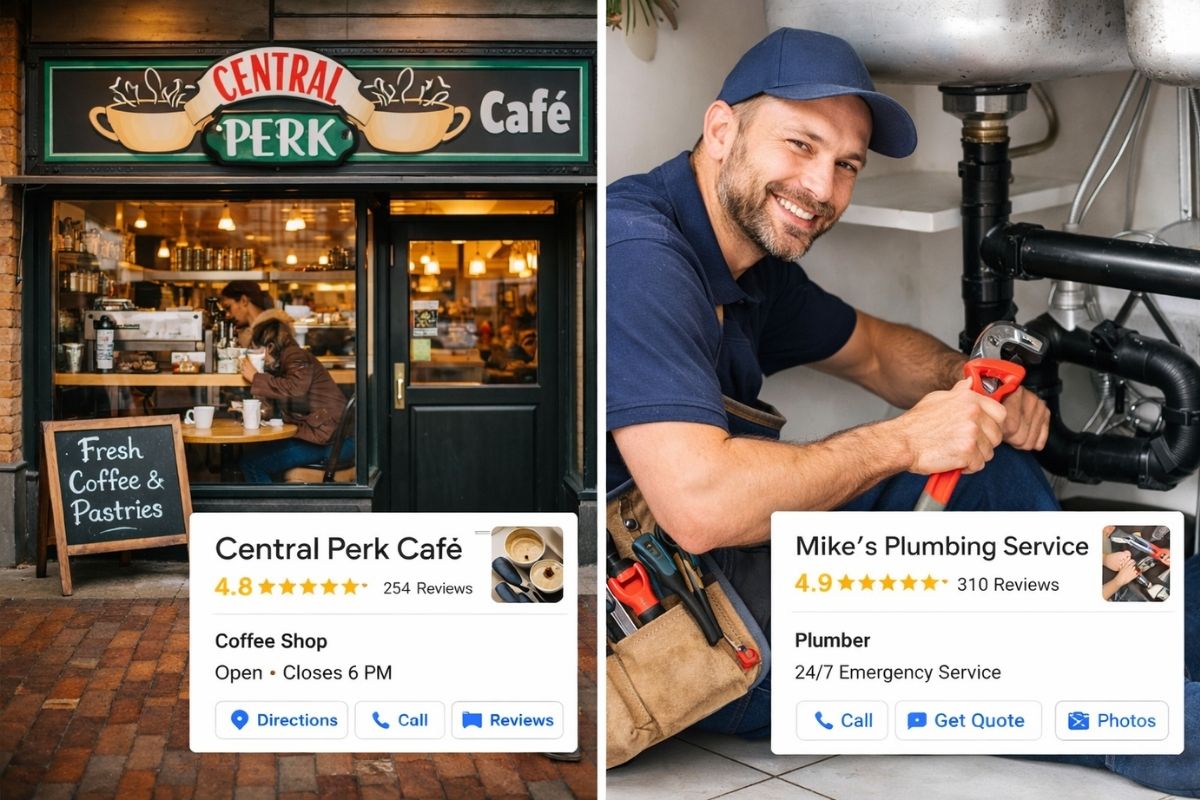
All of this information is made available in the search results even before people visit your website.
How Does Google Business Profile Work?
Trust signals show how Google Business Profile work. Google examines three of the most important factors: relevance, distance, and prominence. All of these three characteristics are connected to your business profile.
Your profile categories and services increase relevance, and your business address clearly determines the distance. Google reviews, people’s interactions, and uniformity all enhance prominence online. When you do great work in all of these aspects, Google tends to show your business to more people and to the most suitable customers.
This is one of the primary advantages of having a Google Business Profile: you get to guide how Google interprets and displays your business to people searching in your area.
Benefits of a Google Business Profile for Local Businesses
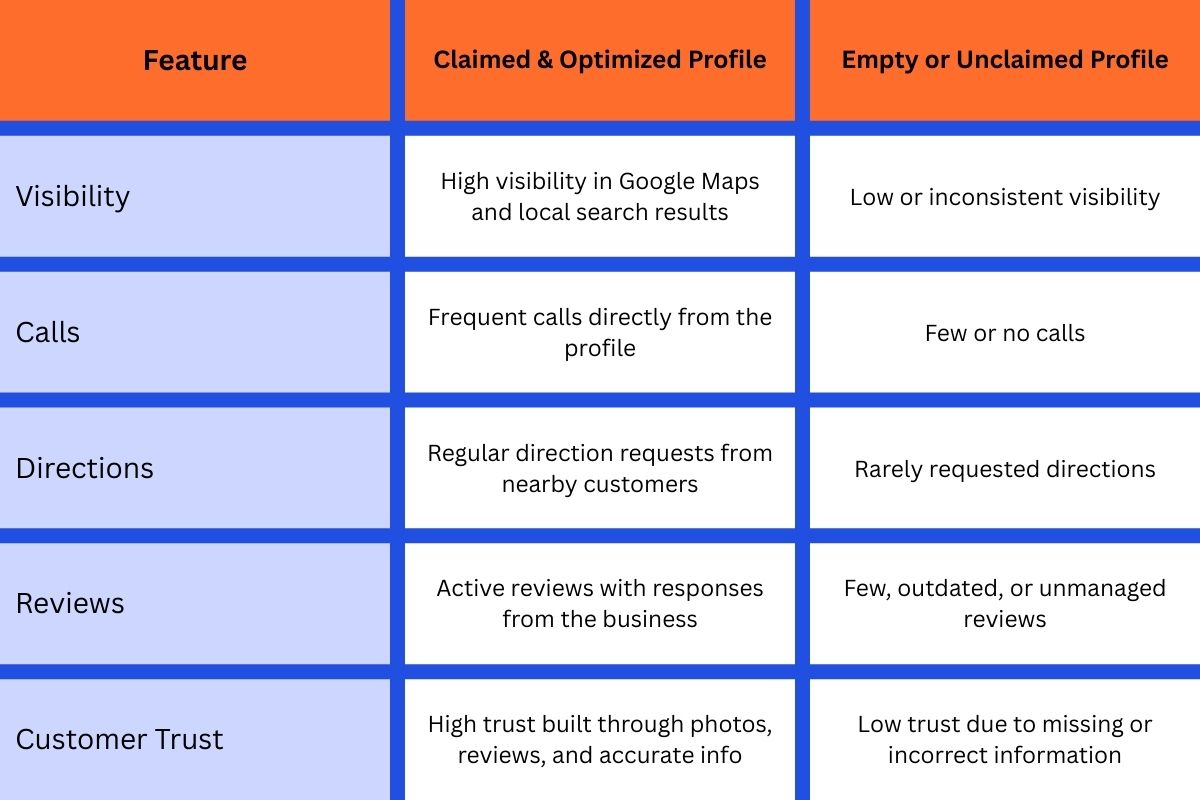
Having Google Business Profile benefits is more extensive than just appearing in search results. Your Google Business Profile influences the type and quality of leads your business is receiving. Most importantly, you’re catching people who are ready to take the next step. Someone searching locally is about to call or visit. Second, you remove all the friction. They can see your hours, get directions, or call you all in one tap. Third, you build trust before you even talk to them. Reviews and photos serve as social proof before anyone picks up the phone.
Here’s something most people miss: even if you don”t claim your profile, Google can still show your business using scraped data from the Internet. That can mean wrong hours, old numbers, or inaccurate data. Claiming your business and operational control clears this headache.
The many factors illustrate the about the Google Business Profile for sustainable business growth for the long haul.
How to build the Google Business Profile?
Steps to Create Google Business Profile
Many businesses make the mistake of rushing will lead to long term problem. Knowing the steps to create a Google Business Profile correctly will save you from visibility issues in the future.
First, you need to verify ownership of your business on Google. They will typically mail you a postcard, but it could also be a call or email. Google prioritises the completion of your business profile, but to them, the accuracy is more important than speed. Everything needs to be correct. Your address, business name, and the way you structure your address need to be uniform with the real world.
A lot of listings get filtered out or buried. Google relies on a set of business citations, and if those citations are incorrect, your listing could disappear.
Most people think that to properly set up a Google Business Profile, you simply need to fill out the profile. This is true to a point, but the profile is only the icing on the cake. Your primary category is the one place you could get a little more creative, but it must represent the consensus of the industry. Service areas must reflect where you serve customers.
- If you are closed for the day because it’s a holiday, make sure to note that.
If you understand how to properly set up a Google Business Profile, it builds your trust with Google’s local algorithm and helps to strengthen your profile rankings.
Creating a Google Business Profile Without a Physical Location
Service-oriented businesses such as plumbing, electrical work, and consulting often ask how to create a Google Business Profile without exposing their home address to the world. The good news is that Google allows you to hide your address and still give you a local listing, as long as you set and meet the service area requirements.
Most guides completely overlook this area, but it is vital to getting and staying visible.
Using Google Business Profile Effectively
Most companies know how to set up Google Business Profile, but using it effectively is where most of them fail. You shouldn’t just set it up and forget it.
Posting updates is important. If you have a promotion, share it. If you have a company news update, share it. If you have a new service you want to highlight, share it. Responding to reviews shows that you care about your customers. You should also add new photos often, especially if you are in a visual business like a restaurant or home services.
Most people ignore the Questions and Answers area, but you don’t have to. If you think of questions that customers might ask, you can ask and answer them.
Most active handling of your Google Business Profile may be one of the strongest positives of the Profile, differentiating the listings that perform from the listings that merely exist.
Pro Tip: Competitive Advantage Most Companies overlook
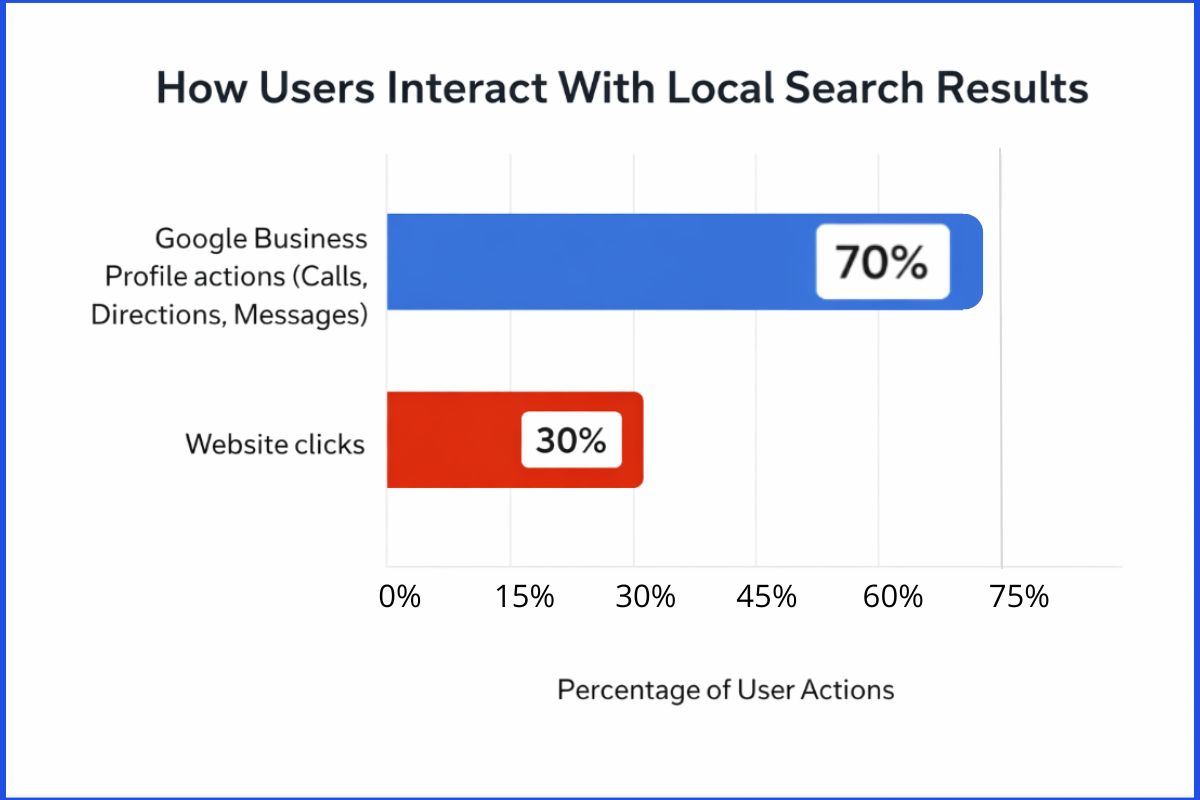
Google is a great place to find new customers, but did you know they also track how customers are interacting with your profile? If your business listing consistently gets direction requests, customers are viewing your pictures, and customers are sending you messages, your business profile will rank higher and more consistently.
Directing real customers to interact with your business profile creates genuine signals that your competitors are unable to fake. This is Google Business Profile Optimization on a more advanced level.
How a Google Business Profile Supports Local SEO
Most people think that a Google Business Profile replaces a business’s website, but that is incorrect; it doesn’t. Your Google Business Profile and your website complement each other. Work and backlinks are also important. Google Business Profile also serves to enhance a website’s visibility, which complements strategies for building discovery and relevance for search engines. Links are always a great way to increase a website’s authority.
All of this falls under Local SEO, with your Google Business Profile being the most important part.
Google Business Profile FAQs
It’s free! Google allows you to create and manage your business profile at no cost.
With Google verification, it typically takes between 7 to 14 business days.
Yes! Many service-oriented businesses use Google Business Profile to generate leads.
Yes! They help increase engagement and ultimately conversions.
Yes! You can create location groups with one account to manage multiple locations.
The First Step
Creating a Google Business Profile is essential for the success of your business. Treating your business profile like a valuable asset will help your business get more phone calls and increase the number of high-quality leads coming to your business. If you don’t use your Google Business Profile, your competitors will.
Spend some time on your Google Business Profile and fix any inconsistencies. Then start using it. Doing this will unlock valuable local business opportunities, and it’ll require very little effort!